Ticketmaster HQ


News
How to Safely Sell Your Tickets on Social Media
A new way to securely sell your tickets with a link you can share on social media – here's what you need to know
Plans change – and when you can’t make it to an event, you’ll now have a new way to securely sell your tickets with a link you can share on social media. Using your dedicated Ticketmaster link gives you a safe way to directly share your ticket listing with your network, increasing the chance your tickets sell. Once your tickets are purchased, Ticketmaster ensures that your sale is processed safely and securely.
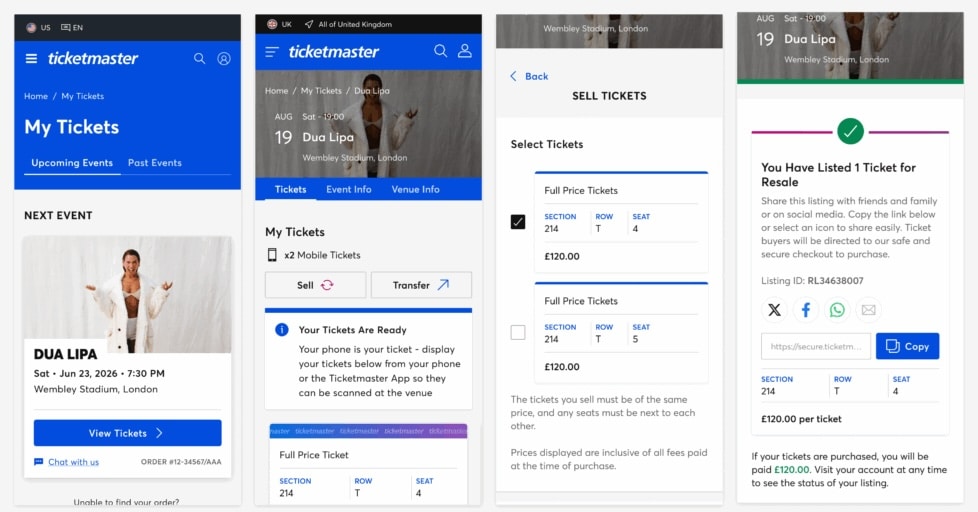
Check out the step-by-step instructions on how to generate your personal link below.
- 1. Sign into your Ticketmaster Account.
- 2. Select your order in the My Tickets section and press Sell.
- 3. Select the tickets you want to sell and click Continue.
- 4. If you’re listing for the first time, you’ll need to enter your identity and payment details.
- 5. Review your listing and you’re done.
Note: If you’re buying tickets through social media, look out for potential fake links. Ticketmaster listing links will always start with https://secure.ticketmaster.co.uk.
Once your tickets sell, we’ll ensure you get paid promptly.